Unlocking the Mystery: How Google Cloud Vision Powers WhereWasThisPhoto.com
Discover how WhereWasThisPhoto.com uses Google Cloud Vision's landmark detection, OCR, and web entities to pinpoint the location of your images.
Author
Published
Read time
We have all been there. You find an old family photograph tucked away in a shoebox, or you stumble upon a stunning travel photo online with no caption. The image is beautiful, but the context is lost. You find yourself asking the same question: Where was this photo taken?
At WhereWasThisPhoto.com, we don’t just guess; we analyze. To provide you with the most accurate location data possible, our platform leverages the industry-leading power of Google Cloud Vision.
But what is Google Cloud Vision, and how does it actually pinpoint a location from a single JPEG or PNG? Below, we break down the four pillars of image analysis that we use to turn pixels into places.
1. Landmark Detection: The Digital Cartographer
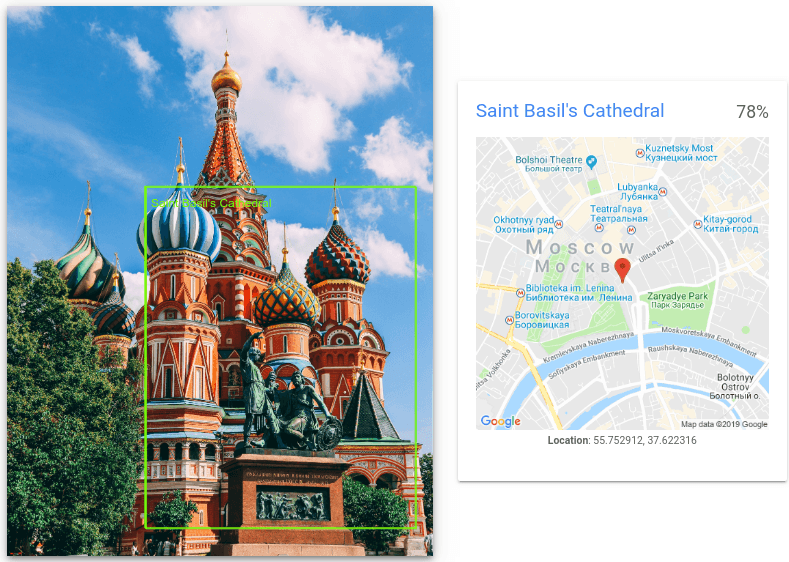
The most direct way to find a photo’s location is recognizing a famous structure. This is where Google’s Landmark Detection shines.
When you upload an image to our site, the Cloud Vision API scans the photo for known man-made or natural structures. It compares the visual data against a massive database of millions of global landmarks.
- How it works: It doesn't just tell us "This is the Eiffel Tower." It returns specific latitude and longitude coordinates and a "confidence score."
- Why it matters: Even if the photo is taken from an obscure angle or partially obscured by fog, the AI can often identify the geometry of the structure, allowing us to pin the exact location on a map with high precision.

2. Text Detection (OCR): Reading the Signs
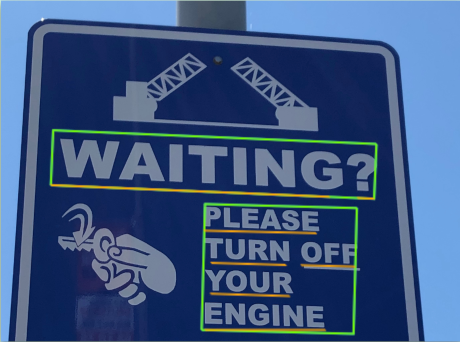
Sometimes, the clues aren't in the scenery, but in the writing. A blurry street sign, a shop front, or a billboard in the background can hold the key to the city or country.
We utilize Google’s Optical Character Recognition (OCR) to extract text from your images.
- How it works: This feature detects and transcribes text within an image, even if it is rotated, stylized, or written in a foreign script.
- The clues: By identifying the language on a sign, a specific street name, or a unique local business, we can triangulate a location even without a famous landmark. For example, a sign reading "Rue de..." instantly narrows the search to French-speaking regions.
3. Scene Labels: Understanding the Context
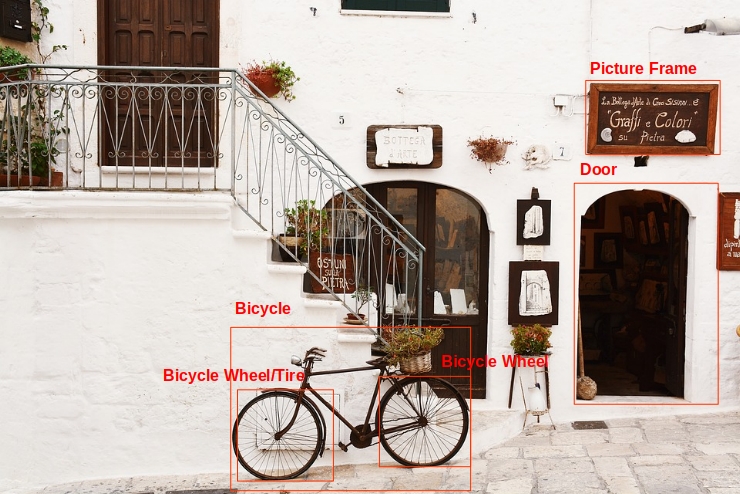
What if there is no text and no famous building? This is where Label Detection becomes vital. This feature analyzes the general "scene" of the photo to categorize its contents.
- How it works: The AI tags the image with descriptors such as "urban," "rainforest," "beach," "desert," or "tundra."
- The application: While "beach" doesn't give us coordinates, it drastically filters the possibilities. When combined with other data points (like the angle of the sun or vegetation type), these labels help build a profile of the location, ruling out false positives and guiding the search toward the correct environment.
4. Web Detection: The Power of Reverse Search
Perhaps the most powerful tool in our arsenal is Web Detection. This feature treats your photo as a search query, scanning the entire internet to see if this image—or parts of it—appears elsewhere.
- Similar Images: It finds visually similar images across the web, which often have location tags attached to them.
- Page Matching: It identifies specific webpages that contain the image. If your mystery photo appears on a travel blog titled "Hidden Gems of Kyoto," the mystery is solved instantly.
- Best Guess Labels: Based on how similar images are described online, the API provides a "best guess" text label for the location.
Trust the Technology
Identifying a location isn't magic; it's advanced data science. By integrating Google Cloud Vision into WhereWasThisPhoto.com, we ensure that every pixel of your uploaded image is analyzed for landmarks, text, context, and web presence.
Whether you are trying to recreate a childhood memory, verify a location for investigative purposes, or identify a dream vacation spot, our technology provides the trustworthy, data-backed answers you need.
Ready to find out where your photo was taken? Upload your photo now and let our algorithms do the work.